![What Is PHP SAPI? A Complete Beginner's Guide [2026]](/_astro/php-sapi-beginners-guide-featured-image.BZgfZX9p_Z23w1hj.png)
What Is PHP SAPI? A Complete Beginner's Guide [2026]
Table of Contents
Introduction
When you first start learning PHP, it might feel like magic that a simple .php file can display dynamic content in your browser or run tasks from the command line. The secret behind this “magic” is something called SAPI — the Server API.
In simple terms, SAPI is the bridge that connects PHP with the outside world, whether that’s a web server like Apache or Nginx, or the terminal on your computer.
Understanding PHP SAPI is an important step for beginners, because it helps you see how PHP really works behind the scenes and why different environments (like CLI, PHP-FPM, or mod_php) behave differently.
Types of PHP SAPI
CLI (Command Line Interface)
-
What it is: PHP run from the terminal:
php script.php. -
When you use it: scripting, cron jobs, build tools, migrations, tests.
-
How it behaves: Runs as your user in the shell, has access to STDIN/STDOUT, no HTTP server variables (e.g.,
$_SERVER['REQUEST_METHOD']usually missing). -
Pros: Fast startup for CLI tasks, easy debugging, can have different
php.inithan web SAPI. -
Cons: Not for serving web requests.
-
Detect:
php_sapi_name()returnscliorPHP_SAPI === 'cli'.
[ Terminal / Shell ]
        |
        v
  [ PHP CLI (SAPI: cli) ]
        |
        v
  [ PHP Engine ]
        |
        v
[ Your PHP Code Runs ]
PHP Built-in Server (cli-server)
-
What it is: A tiny web server bundled with PHP for development:
php -S localhost:8080. -
When to use: Local development and testing only.
-
How it behaves: Single-process, not optimized for production.
-
Pros: Super simple to run and test apps without installing Apache/Nginx.
-
Cons: Not designed for production/scale.
-
Detect:
php_sapi_name()->cli-server.
User
  |
  v
$ php -S localhost:8000   (runs single php process)
  |
  v
[Built-in web server process with cli-server SAPI]
  |
  v
routes request -> Zend Engine executes PHP script -> response
  |
  v
Browser
CGI and FastCGI
-
What it is: Classic way web servers call external programs to generate HTTP responses. CGI typically starts a process for each request.
cgi-fcgiis a FastCGI-style naming. -
When you see it: Older setups or some quick host configs.
-
How it behaves: Pure CGI creates a fresh process per request (slow). FastCGI keeps processes around (faster).
-
Pros: Simple standard. FastCGI improves speed.
-
Cons: Plain CGI is slow; you should prefer FastCGI/PHP-FPM for production.
Browser
  |
  v
[Web Server]
  |
  v
(spawn) -> [php-cgi process (short-lived)]
               |
               v
         [Zend Engine] -> execute script -> stdout
               |
               v
Web Server collects stdout -> Response -> Browser
PHP-FPM (FastCGI Process Manager)
-
What it is: The modern, common way to run PHP for production. It’s a FastCGI server that manages pools of worker processes (php-fpm daemon).
-
When to use: Production web apps — most Nginx setups use PHP-FPM.
-
How it behaves: Web server (Nginx/Apache) passes requests to PHP-FPM over a socket or TCP; PHP-FPM serves multiple requests via worker processes. You can configure pools with different users and php.ini overrides.
-
Pros: High performance, good resource control, per-site pools, multiple PHP versions possible.
-
Cons: Adds an extra service to manage (but that’s normal).
-
Detect:
php_sapi_name()typically showsfpm-fcgiorphp-fpmdepending on build;PHP_SAPIoftenfpm-fcgi.
Browser
  |
  v
[Nginx / Apache (FastCGI proxy)]
  |
  v   (FCGI over unix socket or TCP)
[php-fpm master process]  ---> php-fpm worker #1 / worker #2
                                   |
                                   v
                           [Zend Engine] -> execute script
                                   |
                                   v
                         Response -> Web server -> Browser
Apache Module (mod_php / apache2handler)
-
What it is: PHP compiled as an Apache module so PHP runs inside the Apache worker process.
php_sapi_name()showsapache2handler. -
When to see it: Older or simple LAMP stacks (Apache + mod_php).
-
How it behaves: PHP runs with Apache’s process and permissions. No separate PHP process.
-
Pros: Simple single-package setup, no proxying to PHP-FPM.
-
Cons: Less resource-isolated (every Apache process contains PHP), can be heavier memory-wise, harder to run multiple PHP versions, and less ideal with certain web server optimizations.
-
Detect:
php_sapi_name()->apache2handleror similar.
Browser
  |
  v
[Apache HTTPD process]  <-- mod_php loaded into Apache
  |
  v
[Zend Engine (in-process)] --> executes PHP script (index.php)
  |
  v
Response -> Browser
Other SAPIs (ISAPI, LiteSpeed, Embed)
ISAPI and IIS integration (Windows)
-
What it is: Integration with Microsoft IIS servers. Historically ISAPI was used; modern IIS typically uses FastCGI (php-cgi) to run PHP.
-
When to see it: Windows / IIS hosting.
-
How it behaves: Similar concepts to FastCGI or module-based depending on configuration.
-
Detect:
php_sapi_name()may showisapiorcgi-fcgi.
LiteSpeed (lsapi)
-
What it is: A SAPI optimized for LiteSpeed Web Server (LSAPI).
-
When to see it: If you use LiteSpeed hosting.
-
How it behaves: Similar goals as PHP-FPM but tailored for LiteSpeed.
-
Detect:
php_sapi_name()->litespeedorlsapi.
embed
-
What it is: PHP embedded inside another application (e.g., a C/C++ app embedding the PHP engine).
-
When to see it: Rare; only when someone integrates PHP into their own program.
-
How it behaves: Runs inside host process; used by specialized apps.
-
Detect:
php_sapi_name()->embed(rare).
Practical Example: Check Which SAPI We Are Using
We are going to use the following PHP script to test which PHP SAPI we are using in different environments. What we have to do is simply save the script and run it.
<?php
/**
 * PHP SAPI Inspector
 * Shows current SAPI name and availability of common superglobals
 */

// Ensure clean HTML output
header('Content-Type: text/html; charset=UTF-8');

// Detect SAPI
$sapi = php_sapi_name();

// List of common superglobals to check
$superglobals = [
    '_GET',
    '_POST',
    '_COOKIE',
    '_FILES',
    '_SERVER',
    '_REQUEST',
    '_SESSION',
    '_ENV',
    '_GLOBALS',
];

?>
<!DOCTYPE html>
<html lang="en">
<head>
    <meta charset="UTF-8">
    <title>PHP SAPI Inspector</title>
    <style>
        body { font-family: Arial, sans-serif; margin: 20px; background: #f9f9f9; }
        h1 { color: #333; }
        table { border-collapse: collapse; width: 60%; margin-top: 20px; background: #fff; }
        th, td { border: 1px solid #ccc; padding: 8px 12px; text-align: left; }
        th { background: #eee; }
        .yes { color: green; font-weight: bold; }
        .no { color: red; font-weight: bold; }
    </style>
</head>
<body>
    <h1>PHP SAPI Inspector</h1>
    <p><strong>Current SAPI:</strong> <?php echo htmlspecialchars($sapi, ENT_QUOTES, 'UTF-8'); ?></p>

    <table>
        <tr>
            <th>Superglobal</th>
            <th>Available?</th>
        </tr>
        <?php foreach ($superglobals as $sg): ?>
            <tr>
                <td><?php echo '$' . $sg; ?></td>
                <td>
                    <?php echo isset($GLOBALS[$sg]) ? '<span class="yes">Yes</span>' : '<span class="no">No</span>'; ?>
                </td>
            </tr>
        <?php endforeach; ?>
    </table>
</body>
</html>
cli-server
First of all, we will save this in our local machine and start the PHP built-in web server using the command php -S localhost:9900
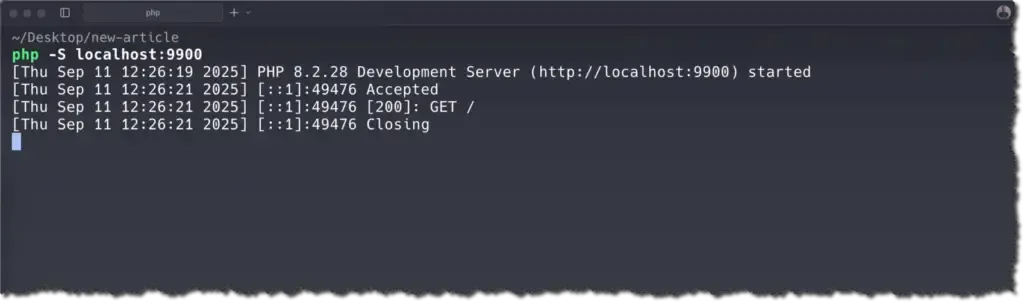
Now we can visit the URL in the browser and see the output:
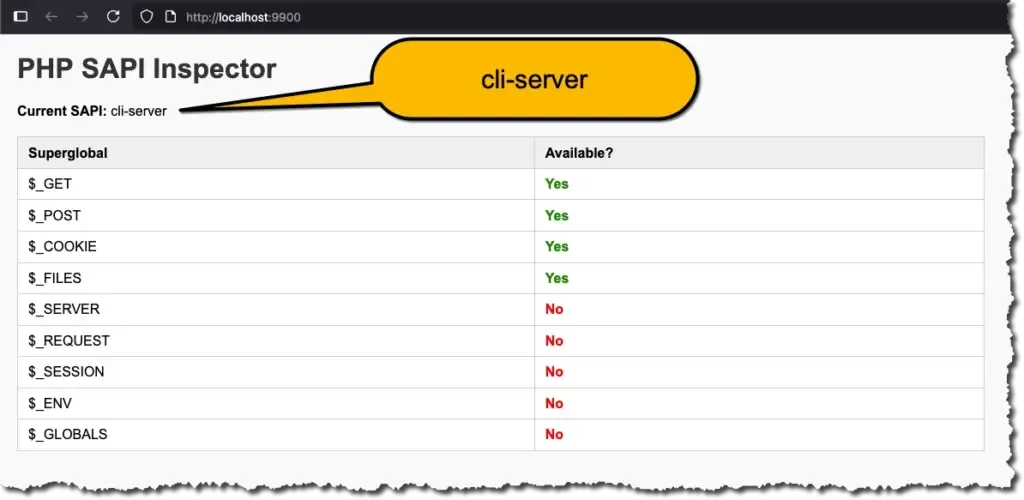
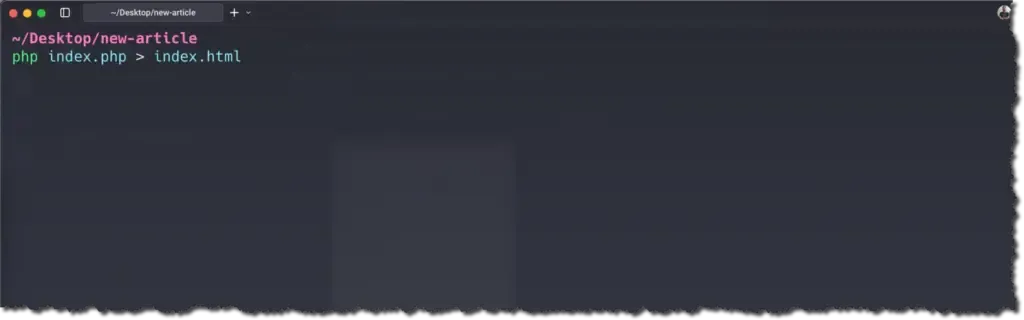
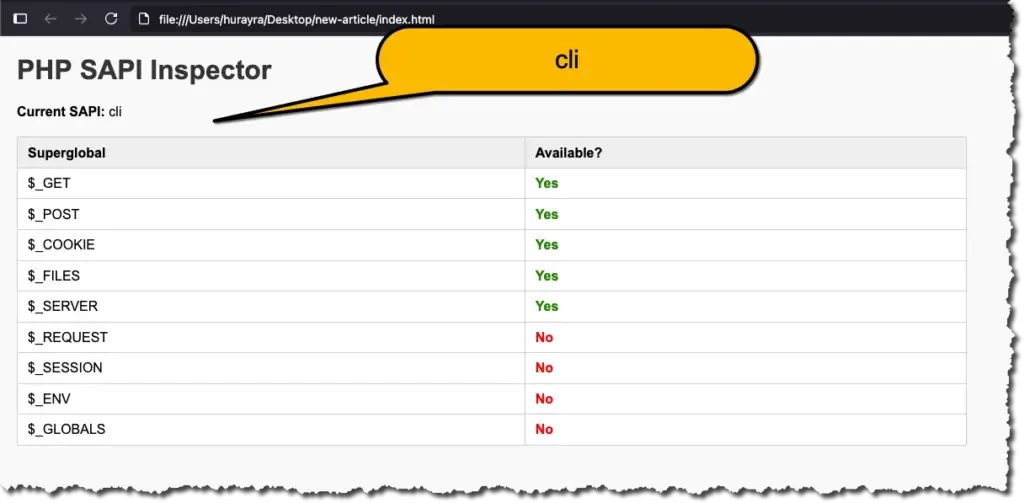
cli
Now we are going to run the script using our terminal and save the output in a file named index.html using this command php index.php > index.html
We can now open the file index.html in a browser and view the output:
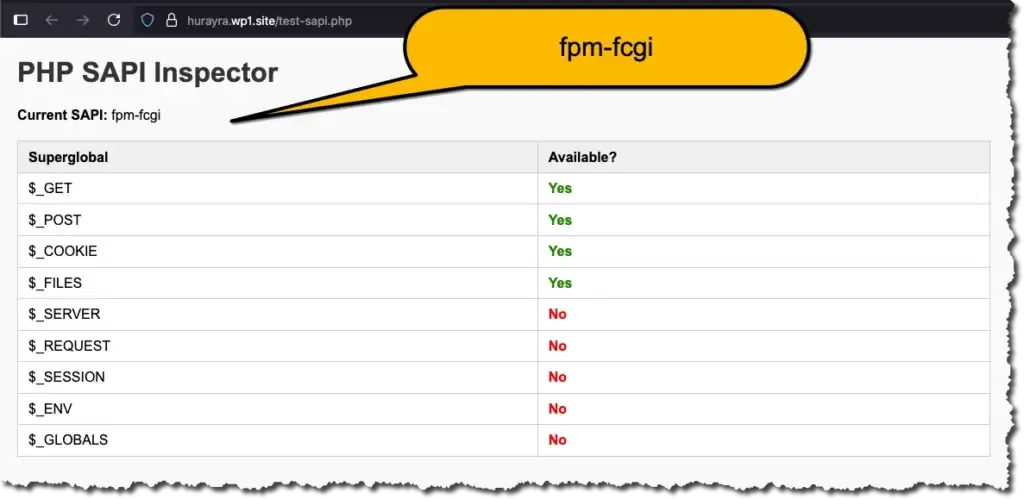
fpm-fcgi
Finally we will upload the file to a live server running nginx and php-fpm. This is the output:
Conclusion
By now, you’ve seen that PHP SAPI is not just a technical detail, but a fundamental part of how PHP communicates with web servers and your system. Each SAPI type — from CLI to PHP-FPM — has its own strengths and use cases, and knowing the differences can help you make smarter choices for performance, security, and scalability. As you continue your PHP journey, keep in mind that while your code stays the same, the SAPI that runs it can greatly influence how it performs in the real world.
References:
If you found this post helpful, consider buying me a coffee. It keeps me writing!
